Tagging Resources
Overview
Tagging is how you tell SkySaver which AWS resources to schedule. Add a single tag to any resource, and SkySaver will automatically manage it according to the schedule you’ve created.
Here’s how the tag key/value relationship works:
Tag(Key): The tag key configured for your AWS account in SkySaver — for example,SkySaverSchedule.Schedule Name(Value): The name of the schedule you created in SkySaver — for example,ec2-est-business-hours.
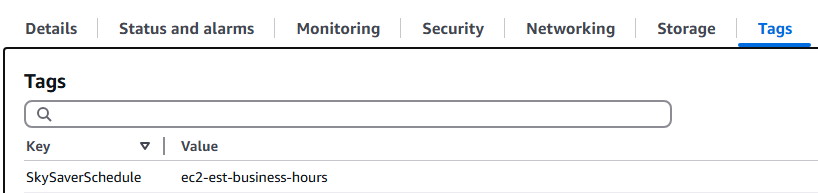
In the example below, the SkySaver tag for the account is SkySaverSchedule and the schedule is ec2-est-business-hours. Adding a tag to the EC2 resource with Key: SkySaverSchedule and Value: ec2-est-business-hours is all that’s needed — SkySaver will start managing the resource according to that schedule automatically.
Common Usage
Each AWS account in SkySaver has one tag key, and each SkySaver project has one Default Automation Tag. Schedule names can be applied across any accounts in your project.
If you manage dozens or hundreds of AWS accounts, you can keep the same tag key across all of them to easily apply schedules at scale — or use a different tag key per account for more granular control. Additional projects can be used if you need even further separation.
The simplest setup is one Default Automation Tag across all accounts in one project. We recommend including “SkySaver” in the tag name for easy identification. Then, to schedule any resource, just add a tag with Key: SkySaverSchedule and Value: <your-schedule-name> — SkySaver will start managing it automatically.
Project Settings
The Default Automation Tag in Tenant Management > Defaults tab is automatically applied to any new AWS accounts added to your project. If you have multiple projects, each can share or use its own tag.
Account Settings
In Tenant Management > Accounts tab, you can edit the tag key for any individual AWS account. SkySaver only manages resources that have the matching tag — untagged resources are always ignored. This ensures schedules are applied intentionally and that unscheduled resources are never affected.